
You're Talking to a Wall
Claude has an entire operating system most creators never touch. Here’s what’s underneath the chat window and why it changes everything.

Most content creators I know use Claude the same way.
Open a new chat. Type a prompt. Receive something you wouldn’t put your name on. Rewrite the whole damn thing. Call it collaboration.
Repeat tomorrow. And the day after. And every day until the sun burns out or you give up, whichever mercifully arrives first.
(I did this for months. Months. I teach people how to co-write with AI for a living, and I was re-introducing myself to Claude every session like a man trying to befriend a goldfish. Full sincerity. Zero retention. Both of us committed to the bit.)
What nobody mentions (because the people who know are developers and developers communicate primarily through GitHub repositories and the belief that all knowledge should be free… but also incredibly difficult to find) is that Claude isn’t just a chat window. There’s an entire architecture underneath it. Layers of markdown files that determine what Claude knows about you, how it behaves, what patterns it follows, and what it remembers between conversations.
Layers. Plural. An entire invisible operating system.
And most creators have never touched a single one. They’re launching prompts into an empty box and wondering why everything that comes back sounds like it was ghost-written by a refrigerator manual.
That’s like buying a Steinway grand piano and only ever sitting on the bench to eat lunch.
The Full Map (You Are Here)
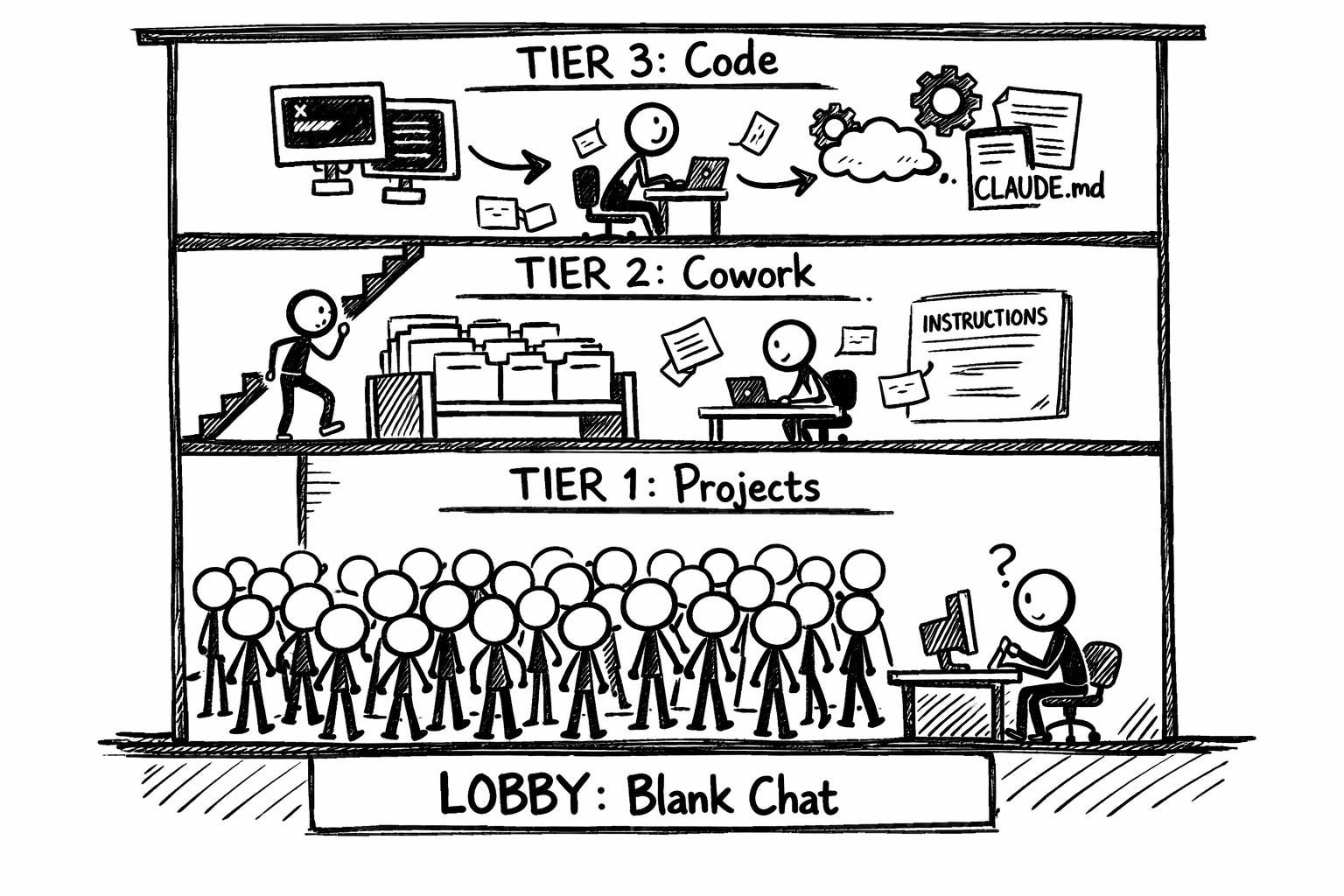
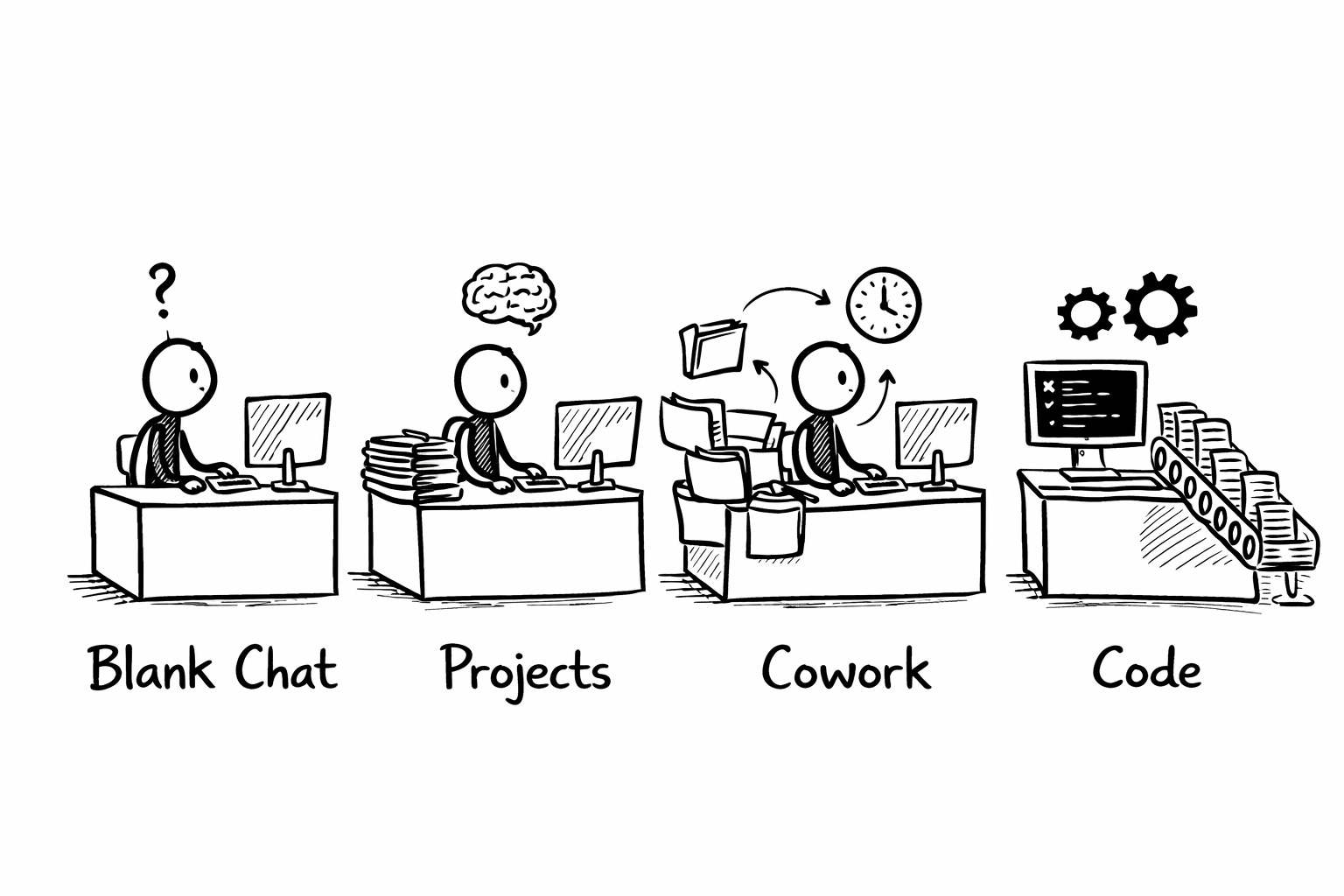
Claude has four distinct operating modes, and each one gives the AI progressively more context about who you are and what you’re trying to build. Think of it as a building. Four floors. An elevator that works perfectly fine.
The problem is that 95% of content creators are milling around the lobby, complaining about the architecture, having never once looked up.
Let me walk you through all four. By the end of this post, you’ll be on the first floor. By the end of this series, you’ll have seen every one of them top-to-bottom.
The Baseline: Naked Chat (The Lobby)
This is where most people live. You open claude.ai, you start a new conversation, and you type your prompt into a white rectangle that knows absolutely nothing about you.
Not your name. Not your niche. Not that you’ve spent three years writing about regenerative agriculture. Not that you’d rather swallow a handful of thumbtacks than use the word “tapestry.” Not that your audience is skeptical small-farm owners in the Pacific Northwest, rather than marketing directors in Manhattan.
Nothing. Claude wakes up with total amnesia every single time.
So it does what any amnesiac would do when asked to write your newsletter. It guesses. And because Claude was trained on the entire internet (which, as a body of literature, makes the phone book look like a compelling page-turner) it guesses toward the statistical average of everything it’s ever seen.
Your output sounds like it was written by the statistical average of the entire internet. Because it was. You didn’t give Claude a reason to go anywhere else.
The instinct is to fix this with better prompts. Longer prompts. More detailed prompts. Prompts with instructions stacked like a legal brief written by someone who really, really wanted you to know they went to law school.
The instinct is wrong.
The fix isn’t a better prompt. The fix is giving Claude something to work with before you type a single word.
Tier 1: Claude Projects (First Floor)
This is the first real upgrade and the one I’m going to teach you to build today.
A Project in Claude is a self-contained workspace with two components that change everything: custom instructions and a knowledge base.
Custom instructions are standing orders that Claude reads before every conversation inside that Project. Your writing patterns. Your audience. Your voice rules. Your banned words. Your formatting preferences. The things you’d normally retype at the top of every conversation with the growing suspicion that you are trapped in a time loop and Claude is the only one who doesn’t know.
The knowledge base is a set of files you upload that Claude can reference during conversations. Voice samples. Content strategy docs. Frameworks you use. Style guides. Anything Claude needs to understand the full context of what you’re building.
Instead of explaining yourself from scratch every time (exhausting, depressing, Sisyphean in the most literal possible sense) you explain yourself once. Thoroughly. In documents that persist across every conversation.
Then every new chat inside that Project starts with Claude already briefed. Already loaded. Already aware that you don’t use em dashes, that your audience cares about implementation over theory, that you sign off with a specific format, that every instance of saying “utilize” requires Claude to apologize in iambic pentameter before continuing.
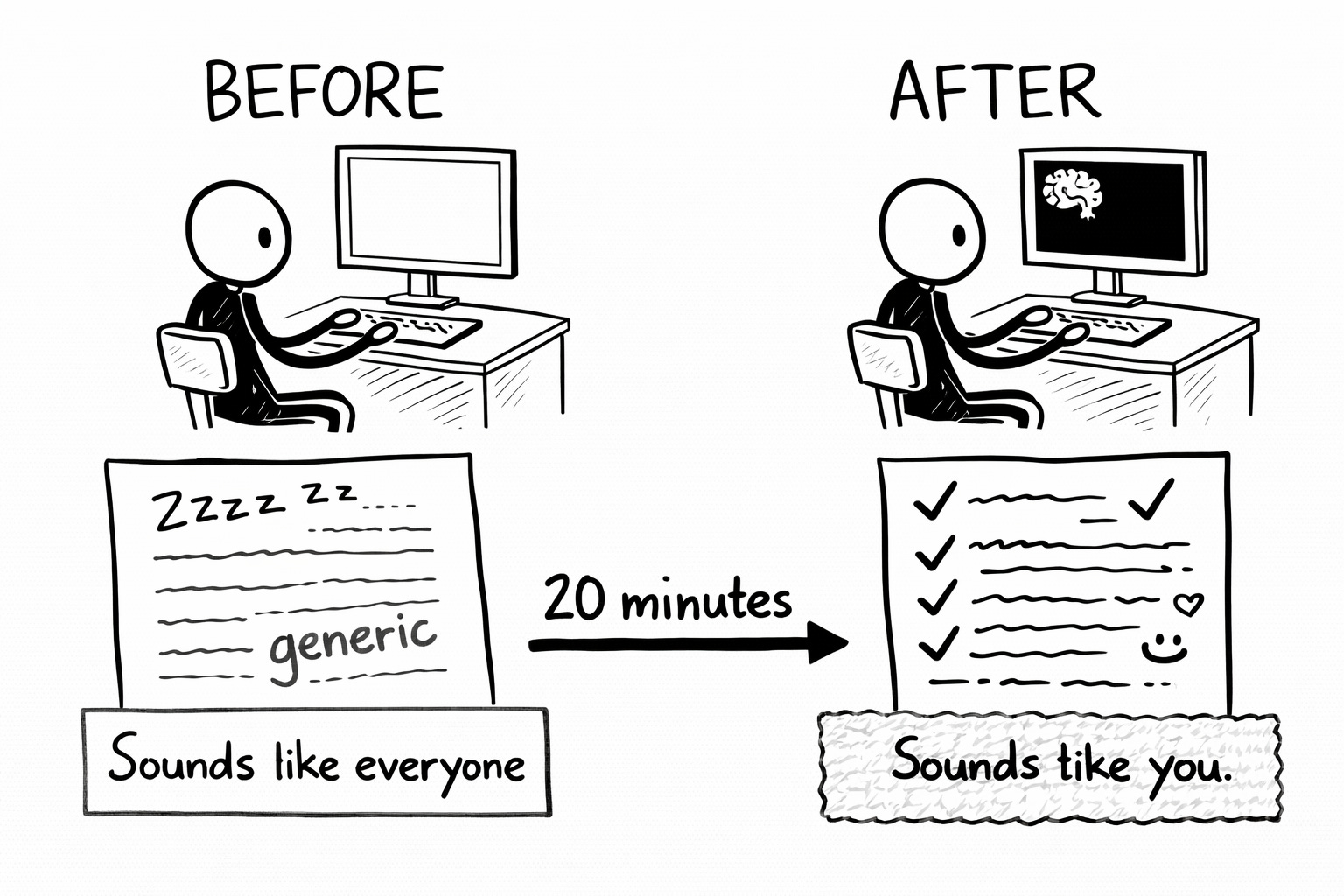
The transformation is so dramatic it’s almost offensive. Twenty minutes of setup. Months of wasted conversations suddenly explained.
(I’ll walk you through the exact setup in a minute. First, let me show you the floors you haven’t seen yet.)
Tier 2: Cowork Projects (Second Floor, Still Has That New-Floor Smell)
This one shipped on March 20. Three days ago. The announcement pulled 2 million views and 11,000 likes. And almost no content creators have any idea it exists because the entire conversation is happening in developer Twitter, which is like a party where everyone’s speaking in acronyms and getting passionate about folder structures.
(To be fair, I’m about to get passionate about folder structures. Glass houses.)
Cowork is a mode in the Claude Desktop app where Claude doesn’t just read what you paste into a chat. It gets direct access to a folder on your actual computer. It reads your files. Writes new ones. Edits existing ones. Organizes your mess. Creates documents from your scattered notes. All without you copy-pasting a single thing into a browser window.
The new Projects feature (three days old, I cannot stress this enough) wraps that power into persistent workspaces. Each Cowork Project gets its own local folder, its own custom instructions, its own scheduled recurring tasks, and (the part that genuinely matters) its own memory that carries between sessions within that project.
For a content creator, this is where Claude stops being a conversation partner and starts being an operational layer of your publishing system. Your drafts. Your voice documentation. Your distribution templates. Your editorial calendar. All accessible to Claude directly. Not uploaded through a browser. Living on your machine, with Claude reading and writing inside them like a very diligent intern who never sleeps and has no opinions about your snack choices.
(This is still a research preview. Your desktop app has to stay open for tasks to run. There’s no cloud sync. It doesn’t support everything that web-based Projects can do. But the skeleton of something significant is assembling itself in real time, and if you squint, you can see the future it’s building toward.)
Tier 3: Claude Code (The Penthouse, Requires a Hard Hat)
This is the builder’s layer. Terminal-based. Designed for developers. Increasingly relevant for anyone building automation into their content operation.
The centerpiece here is a file called CLAUDE.md. It doesn’t exist until you make it. You create a markdown file, name it CLAUDE.md, drop it into your project folder. Claude finds it automatically. Reads it at the start of every session. No uploading. No pasting. No explaining. The file just exists and Claude absorbs it like a briefing document from a spy movie, except instead of classified intelligence it’s your opinions about Oxford commas.
(I have strong opinions about Oxford commas. They will not be disclosed at this time.)
On top of that, there are Skills: reusable workflow files that Claude triggers automatically when the context is relevant. Think “write newsletter” or “generate social posts from this article” or “format this for Bluesky’s character limit.” You write the workflow once as a markdown file, and Claude runs it whenever you need it. No re-explaining. No re-prompting. It just knows.
And then there’s auto-memory. Claude saves what it learns about your project between sessions and loads those learnings next time. “Oh, this creator never uses the word ‘leverage.’ Oh, they like short paragraphs. Oh, they end every newsletter with a discussion question before the sign-off.” Claude writes itself notes. Reviews them before your next session. Adjusts.
For most content creators, this tier is the future. Not today’s to-do list. But if you’re building anything resembling an automated publishing pipeline (scheduled content extraction, multi-platform distribution, templated workflows that run while you sleep) this is where the infrastructure eventually lives.
The CLAUDE.md file alone is worth understanding even if you never open a terminal. Because the principle underneath it (give the AI persistent, structured context in a markdown file so it stops guessing) is the exact same principle that makes Tier 1 Projects work. The mechanism is different. The philosophy is identical.
From the Lobby to the First Floor (The Part Where You Actually Do Something)
Enough cartography. Let’s build.
If you’re currently living in the Baseline (blank chat, every conversation a fresh act of mutual amnesia) here’s how to set up a Claude Project that actually knows who you are. Twenty minutes. No code. No desktop app. Just the browser you’re already using to read this.
Step 1: Create a Project
In Claude, click “Projects” in the left sidebar. Hit “Create Project.” Name it something useful. (Mine is called “Co-Write with AI” because I have the naming creativity of someone filling out a tax form. It works. Nobody’s giving awards for project names.)
You now have two things to configure: custom instructions and a knowledge base.
Step 2: Write Your Custom Instructions
This is the operational layer. Short. Dense. Non-negotiable. These instructions load before every conversation in this Project, so think of them as standing orders, not a creative writing autobiography.
What goes here:
Who you are and what you do. Two to three sentences. Your niche. Your audience. Your platforms. Claude needs the basics the way a new employee needs to know what floor they work on before you ask them to file a report.
Your hard rules. Banned words. Banned phrases. Cliches that make your skin attempt to leave your body. Formatting requirements. Structural formulas. If you always end newsletters the same way, put it here. If the word “utilize” should cause Claude to passive-aggressively italicize it and add a footnote that says “did you mean ‘use’?” then say so.
Your content rules. Posting frequency, content pillars, audience assumptions, format-specific adjustments. If you write differently for newsletters than for social posts, say so.
What you never want Claude to do. No inspirational endings. No emoji. No listicles unless asked. Whatever your guardrails are, plant them here.
Keep the whole thing under a page. Dense beats sprawling. Instructions that run long enough to qualify for serialization get diluted, and Claude starts treating them the way you treat the terms-of-service agreement on a new app. Which is to say: it skips the parts that don’t seem immediately relevant (i.e. ALL of them.)
What does NOT go here: detailed voice documentation. Your sentence rhythm patterns. Your vocabulary deep-dives. Your examples of “this is what I sound like at my best.” Those are reference documents, not standing orders. They belong in the knowledge base. Which brings us to…
Step 3: Build Your Knowledge Base
This is where Claude gets depth. The custom instructions tell Claude what to do. The knowledge base shows Claude who you are.
Upload files that give Claude the kind of context that would take you four conversations to explain by hand. These are reference documents Claude can pull from mid-conversation. Think of them as the reference shelf in a newsroom. Nobody reads them cover to cover. Everybody reaches for them when they need something specific.
The most important file you can put here is one that teaches Claude how you write. And I mean how you actually write, not how you’d describe your writing at a dinner party. “Conversational and friendly” is a dinner party answer. (That’s like walking into a hair salon and saying “make it look nice.” You’re getting whatever they feel like, and you deserve it.) Claude needs the mechanical stuff. Sentence length. Punctuation habits. Words you love. Words that make your skin attempt to leave your body. How you start pieces. How you end them. The patterns that make your readers recognize you before they see your name.
Do your sentences run short or long? Do you swear? Do you use headers or avoid them? Do you open with stories, data, questions, or confession? Do you end pieces neatly or leave them hanging? What words do you overuse on purpose? What words would you pay money to never see in your own writing? Everyone has these patterns. Almost nobody has written them down. Which is why Claude keeps guessing and guessing wrong.
If you don’t have a voice document yet, the Voiceprint Quick-Start Guide walks you through the basics of building one from scratch. It’s free. It’s the single most useful thing you can upload to a Claude Project because it transforms the output from “competent stranger” to “rough draft that actually sounds like you wrote it.”
What else works well in the knowledge base:
Voice samples. Three to five paragraphs of your absolute best writing. The sentences that made you think “yes, that’s the one.” Claude uses these as calibration.
Your content strategy. One page. Content pillars. Target audience. Positioning. What makes you different. Claude references this when suggesting angles instead of pulling from the infinite generic void.
Frameworks you teach or use. If you have a methodology, a recurring structure, or a signature approach that shows up in your content, document it and upload it.
You don’t need all of this on day one. Start with the custom instructions and one voice document (even a rough one). The system gets sharper as you feed it.
Step 4: Test It and Prepare to Feel Things
Open a new chat inside your Project. Ask Claude to write something you’d normally write. A social post. A newsletter intro. An email to a collaborator. Something you have a feel for.
Compare it to what you’d get from a blank chat.
The gap will make you want to write a formal letter of complaint to your past self. The output won’t be perfect (you’re still going to edit, you should always edit, that’s where the fingerprints go) but it will be recognizably, unmistakably closer to your actual voice than anything a blank chat has ever produced.
(The first time I did this, I had the same feeling you get when you discover the thing you’ve been doing manually has had an “automate” button the whole time. Not joy. Something adjacent to joy but angrier.)
What’s Coming Next (And Why You Should Care)
This post mapped the building. Lobby to penthouse. Four floors. One elevator.
But mapping isn’t building. And I’m not in the business of handing someone a blueprint and wishing them luck. (That’s what consultants do. I’ve been a consultant. The guilt is lifelong.)
Over the next few weeks, I’m going to migrate my own publishing system from Tier 1 (where it lives right now, inside Claude Projects on the web) toward Tier 2 and eventually Tier 3. Cowork Projects are three days old. Nobody has a polished workflow inside them yet because nobody’s had them for longer than a long weekend and a questionable amount of coffee.
But the bones are visible. Local file access. Persistent memory within projects. Scheduled tasks that run without you babysitting them. Direct read/write on your drafts and voice documents. The shape of a full publishing engine, operated by one person, powered by markdown files Claude reads before you’ve even finished your morning caffeine ritual.
I’m going to build it in public. Document what breaks. Document what works. Document the specific moment where I throw my laptop across the room because a scheduled task reformatted my entire drafts folder at 3 AM. (This hasn’t happened yet. But I have a sense for these things.)
If you’re a creator still running your AI collaboration through blank chats, start with Tier 1 today. The instructions above are everything you need.
If you’re already using Projects and you’re looking up at the floors above you, stay with me. We’re going up.
(The elevator music is terrible. I apologize in advance.)
🧉 What floor are you on right now? Blank chat? Projects? Something more advanced? And if you’ve set up a Project, what’s the one instruction you added that made the biggest difference?
The building was always there. The architecture was always underneath it. You were just never told where the stairs were.
Crafted with love (and AI),
Nick “Took The Stairs” Quick

PS... If you want a head start on the voice documentation that goes INTO your Claude Project, the Voiceprint Quick-Start Guide walks you through the exact process. Free. No email required to read, but joining the list gets you the full toolkit as I build it:

PPS... If this was useful, a like, comment or restack helps it reach other creators who are currently screaming into the void and blaming the void for not understanding them. Which, statistically, is most of them.
Until last week I would have said people already have project instructions and skills in place, but I have been kinda shocked to find out differently. A lot of people use AI, write about it, have virtually no documentation to create context. After my big Claude dilemma, I threw everything existing out and I now have ten new project instruction docs that sit in varying ways across all projects (and a little spreadsheet to manage their distribution and reviews!). Still testing, but so far, pretty good! One turned into a skill yesterday, woo hoo. I don't understand why people use AI with no persistent context, but I appreciate you taking us all through it and yelling it at the people slouching in the back 😆
Have been stuck in the Naked Chat Escape room myself only with no voice offering clues as to how to get the next tier. The bit on Claude CoWork projects was quite timely. How'd you know? Will colab with AI to develop custom instructions and knowledge base.